

Formlab account: bdmlstanford@gmail.com Password: grasp like a gecko!
- If you have never used the Form 4 printer before, please either go to Room 36 to get trained in PRL or reach out to Xinyi Liang (xyliang [at] stanford.edu) or EmJ Rennich (emj [at] stanford.edu)**
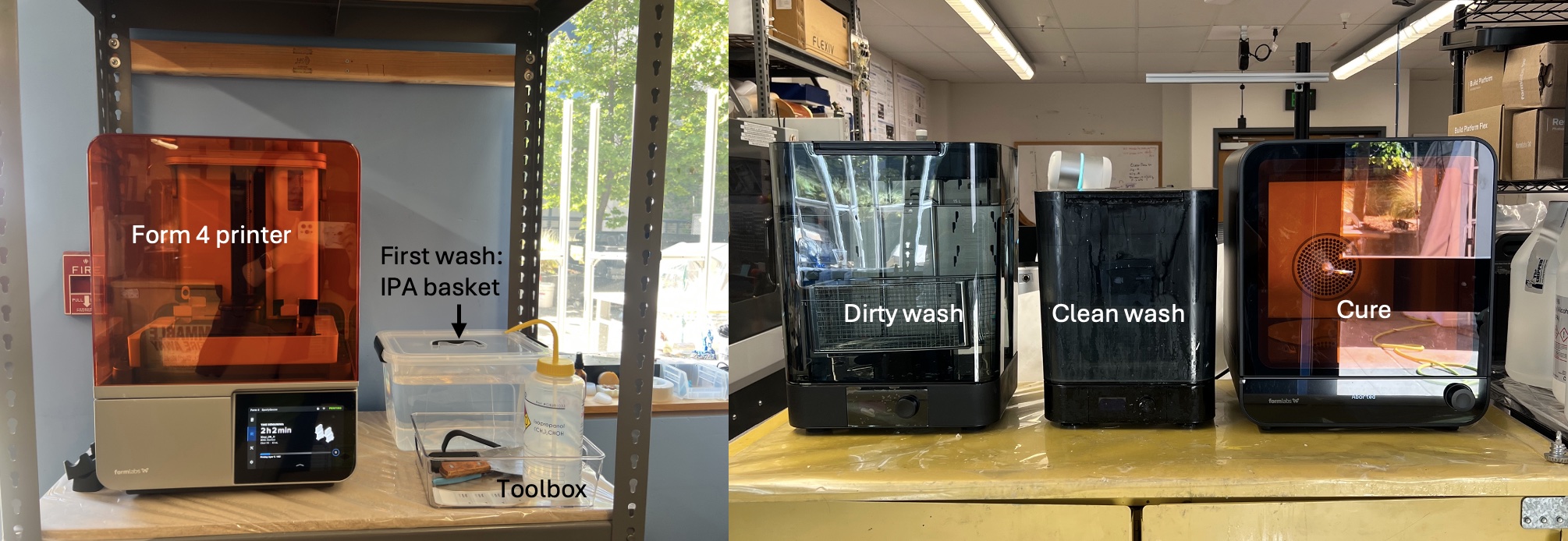
Form4 Printer setup, labeled
If you log in to PreForm with this account, you should be able to see the printer SportyGoose.
General Workflow:
- Insert a clean build plate into the printer, load the correct tank and resin, and start the print.
When the print finishes:
- Open the lid of the first wash IPA basket, submerge the printing surface and parts in IPA. Swing the build plate for at least 2 minutes to remove excess resin.
- Transfer the build plate with prints to the dirty wash and start washing. Make sure you close the lid of the first wash IPA basket!
- Transfer to clean wash if you want a third wash. The clean washer cannot fit the Form 4 build plate. To run a clean wash after the dirty wash:
- Remove the prints from the build plate.
- Place them into the metal basket inside the clean washer.
- Clean the build plate with IPA at this step to prevent resin from curing onto it.
- Allow the prints to dry, then place them into the curing unit (Recommended).
- Lower and close the washer as soon as you finish washing to minimize IPA evaporation.
- If the IPA level in the dirty wash is below the 14L marker, add more IPA up to the 15L marker for thorough cleaning. Same for the clean washer.
Guidelines for Consistent Print Quality
- Always wear gloves while printing and during post-processing — resins are toxic!
- For flexible build plates, the resin trapped between the flexible print surface and the build plate must be cleaned every time you switch to a new resin. The current plan is to dedicate one build plate to Clear V5 and another to Rigid 4K; both build plates are labeled.
- A standard Form 4 build plate (without a flexible print surface) is available for other resins.
- Name your print as FirstName_Month_Date before uploading it to the queue.
- If any surface or tool becomes sticky with resin (e.g., knobs of washers and cure, top surface of flammable cabinet, tools, etc.), please clean it immediately.
- Return all tools to the toolbox after use and keep the top surface of flammable cabinet away from random tools, prints, parts, etc.
If you notice any issue with the printer, washer, or curing unit, let me know right away. No one will be blamed — I just want to fix it ASAP. (Leaks are especially serious; one destroyed our old Form 3 printer.)
- If we are running low on shared resin, tanks, IPA, or other printing materials, reach out to Xinyi Liang (xyliang [at] stanford.edu) or EmJ Rennich (emj [at] stanford.edu)
Page last modified on September 26, 2025, at 12:46 pm